The gripper
The arm was a class you wrote. The gripper is the other way: a module someone else already wrote, installed into the project in one command.
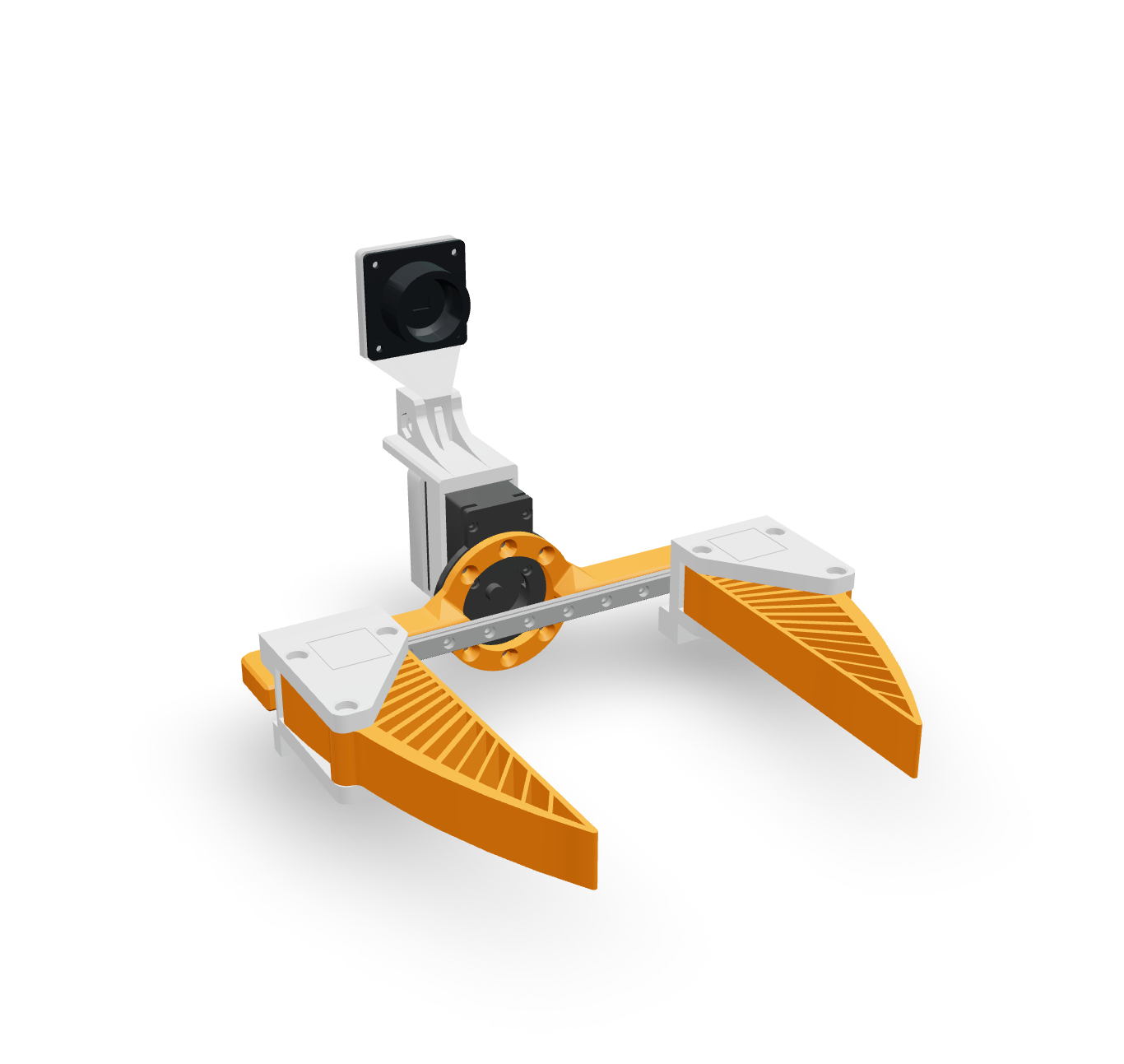
UMI-slim is a two-finger gripper. One servo drives both fingers, and you command it by how far apart the fingertips are, in millimetres. 0 is closed. About 85 is open. The Feetech variant is UmiSlimFeetechModule.
Install it
From the project root:
solarian install umi-slim
That installs solarian-umi-slim (and the Feetech driver it depends on, if you skipped it) and records the dependency. This plugin ships the module class and the MuJoCo model inside the package. It does not ship a YAML template, so the config file is still yours to write. The class is what you did not have to write.
Mount it
Add the attribute. The name right_gripper is the module name from here on. In so106/robot.py:
from solarian_umi_slim import MJCF_FEETECH_PATH
from solarian_umi_slim.umi_slim_feetech import UmiSlimFeetechModule
and on the class, under right_arm:
right_gripper = UmiSlimFeetechModule()
The gripper's model has to be bolted to the arm, not dropped on the floor. The arm model has a site named flange. The gripper model has a site of the same name. Mating site to site is the attachment. Add a second ModuleAttachment in the scene's attachments list:
ModuleAttachment(
    module="right_gripper",
    mjcf=MJCF_FEETECH_PATH,
    parent_site="right/flange",
    child_site="flange",
    prefix="right_gripper/",
),
parent_site is a site in the scene after the arm's prefix, so it is right/flange, not flange. child_site is a site in the gripper's own file, before its prefix is applied. MJCF_FEETECH_PATH points at the model inside the installed package. You do not copy meshes for the gripper.
right_arm.py does not change. The arm does not know it has a tool. The scene does.
Config
Add a port to conf/deployment/localhost.yaml. On the real robot the gripper shares the arm's bus; using the same path now means Tutorial 3 does not have to invent a second adapter.
actuator_port_right_gripper: /dev/ttyUSB0
Create conf/modules/right_gripper.yaml:
actuator_port: ${deployment.actuator_port_right_gripper}
frequency: 50
interpolator_type: scalar

actuators:
  gripper:
    id: 7
    port: ${actuator_port}
    mode: range_m100_100
    sim_joint: "right_gripper/left_manifold_to_rail"
    sim_range_min: 0.0
    sim_range_max: 0.0545
    sim_drive_mode: 1
id: 7 keeps the gripper off the arm's 1–6. sim_joint is the one prismatic joint the gripper model actuates; an equality in the model drives the other finger the opposite way, so one command opens both. sim_drive_mode: 1 flips the direction so −100 in normalized space is closed and 100 is open, matching the module. You command millimetres. The module converts.
The filename is right_gripper.yaml because the attribute is right_gripper.
Schema and keys
Add the gripper to the observation and the action, or the class check fails at startup.
In so106/observation.py:
class RightGripperObs(ModuleObs):
    gripper = SensorField(So106Robot.right_gripper.gripper.pos)


class So106Observation(Observation):
    right_arm = RightArmObs()
    right_gripper = RightGripperObs()
In so106/action.py:
class RightGripperAction(ModuleAction):
    gripper = ActuatorField(So106Robot.right_gripper.gripper.pos)


class So106Action(Action):
    right_arm = RightArmAction()
    right_gripper = RightGripperAction()
In the controller's __init__, next to the arm's action type:
self.target.right_gripper.action_type = ActionType.MOVE_J
self.target.right_gripper.gripper.value = 40.0
40 mm is half open, so you can see the fingers. Extend _KEYS:
"[": ("gripper", -5),
"]": ("gripper", 5),
and teach on_key_down to write the gripper field when the joint name is gripper, clamped to 0–85, and the arm field otherwise. The gripper value is millimetres, not the −100–100 range. A compact version of the handler:
@event_handler(EventType.KEY_DOWN)
def on_key_down(self, event: Event):
    step = _KEYS.get(event.data["key"])
    if step is None:
        return
    joint, delta = step
    if joint == "gripper":
        field = self.target.right_gripper.gripper
        field.value = max(0.0, min(85.0, field.value + delta))
        return
    field = self.target.right_arm[joint]
    field.value = max(-100.0, min(100.0, field.value + delta))
Look at it
Restart the robot and the controller. The sim arm should be wearing the gripper. [ closes the fingers, ] opens them. The arm keys from the previous chapter still work.
If the gripper shows up on the floor, or the process dies naming flange, the parent site is wrong. It has to be right/flange: the arm prefix plus the site in the arm model. right_gripper/flange is the gripper's own site after attachment, which is not the parent.
Next: the camera.